
Zendesk Review 2026: Customer Support & Help Desk Simplified
Imagine you are the Head of Customer Experience for a global retail giant. Your team is receiving thousands of messages every hour through email, WhatsApp, live chat, and traditional phone calls. Without a centralized system, your agents are constantly switching tabs, losing track of conversations, and missing critical service level agreements.
This fragmentation leads to frustrated customers and burnt-out employees. Small businesses might get away with using a shared inbox, but a large corporation needs a “mothership” to govern every single touchpoint. You need a platform that can handle complex routing, deep data analytics, and high-level security standards.
Zendesk was built to be that command center for mid-market and large enterprises. It is a comprehensive Customer Experience (CX) platform designed to scale with the most demanding organizations. It aims to turn every customer interaction into a data point that helps you improve your overall business strategy.
In this Zendesk review, we will cover features, pricing, pros, cons, and alternatives.
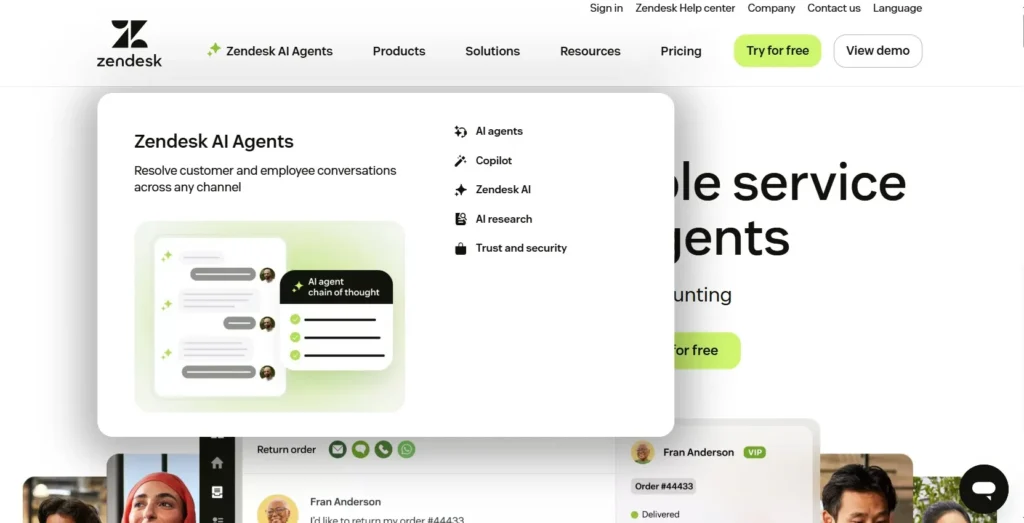
Quick Verdict — “Tiny Tool Take”
Zendesk is the undisputed leader for enterprise-grade customer support and CX management. It offers a level of scalability and reporting depth that few competitors can match.
Who this is for: It is perfect for large corporations with complex workflows, but it is often too expensive and complicated for small businesses or solo founders.
Who it is NOT for: Zendesk isn’t the best fit for very small teams or solo entrepreneurs who need a lightweight, budget‑friendly support tool. It can also feel excessive for businesses that don’t require advanced automation, multi‑channel integrations, or enterprise‑level features. If your priority is simplicity over scalability, Zendesk may be more than you need.
Rating: 4.6/5 ⭐⭐⭐⭐⭐
Key Features
Centralized Ticketing and Omnichannel Support
The foundation of Zendesk is its ability to pull every customer interaction into a single, unified ticket. Whether a customer sends a DM on Instagram or an official email, the agent sees the same interface. This eliminates the need for agents to learn multiple platforms or manage separate logins.
This matters because it provides a “single source of truth” for every customer. An agent can see the entire history of a customer’s interactions across all channels in one timeline. This prevents customers from having to repeat their problems every time they reach out via a different method.
Zendesk AI and Intelligent Triage
Zendesk has heavily invested in artificial intelligence to automate the most repetitive parts of support. Their AI can perform “Intelligent Triage” by automatically detecting the intent, language, and sentiment of an incoming ticket. It then routes the ticket to the agent best equipped to handle that specific issue.
This matters because it significantly reduces the “time to first response.” The AI can also suggest specific macros or solutions to agents, helping them solve problems faster. For large teams, this automation acts like a digital air-traffic controller that keeps the queue moving efficiently.
Advanced Analytics with Zendesk Explore
Data is the lifeblood of an enterprise, and Zendesk Explore provides the tools to analyze it. It offers pre-built dashboards that track key metrics like average resolution time, agent productivity, and customer satisfaction (CSAT). You can also build highly customized reports to drill down into specific regional or product-based trends.
This matters for decision-makers who need to justify headcount or identify recurring product defects. By seeing the big picture, you can move from reactive support to proactive business improvement. It turns your support department from a cost center into an intelligence hub.
Agent Workspace and Side Conversations
The Agent Workspace is a highly customizable interface where agents spend their day. It includes a feature called “Side Conversations,” which allows agents to collaborate with internal teams or external partners without leaving the ticket. They can send a Slack message or an email to a developer directly from the Zendesk UI.
This matters because it keeps all collaboration linked to the customer ticket for future reference. It reduces the “context switching” that often slows down resolution times for complex technical issues. It ensures that everyone involved in a solution has access to the same background information.
Zendesk Guide and Self-Service Portals
A major part of enterprise CX is reducing ticket volume through self-service. Zendesk Guide allows you to build a comprehensive, multi-brand knowledge base and a community forum. The AI-powered “Answer Bot” can suggest relevant articles to customers before they ever reach an agent.
This matters because it empowers customers to find answers on their own terms and schedule. It deflects a huge percentage of basic “how-to” questions, allowing your human agents to focus on high-priority problems. A well-maintained Guide can save an enterprise thousands of hours in manual support every year.
Ease of Use
The dashboard clarity of Zendesk is impressive given its massive feature set. It uses a clean, professional aesthetic that prioritizes high-volume work. However, because it is an enterprise tool, the settings menus are deep and can be quite intimidating for a casual user.
The setup process is a significant undertaking for any large organization. Unlike simple tools that you can set up in five minutes, Zendesk often requires a dedicated implementation period. Many corporations choose to work with a certified Zendesk partner to ensure their workflows and integrations are configured correctly from day one.
The learning curve is steep for administrators but moderate for agents. Once the system is configured, an agent can be trained on the basic ticketing functions within a day. Mastering the advanced reporting and automation logic, however, takes several weeks of hands-on experience and perhaps formal certification.
Performance & Reliability
Zendesk is built on a robust, global infrastructure designed for 99.9% uptime. For an enterprise, even an hour of downtime can result in thousands of missed customer interactions. Zendesk’s stability is one of the primary reasons large corporations trust it with their entire customer database.
The speed of the platform remains consistent even when managing millions of active tickets. The API is highly responsive, allowing for seamless data flow between Zendesk and other enterprise tools like Salesforce or NetSuite. This reliability ensures that your customer support never becomes a bottleneck for your global operations.
The output quality of the customer-facing elements is high. The Help Center templates are mobile-responsive and can be fully branded to match your company’s visual identity. This creates a professional and seamless experience for the customer, who may not even realize they are interacting with a third-party platform.
Pricing & Plans
| Plan | Best For | Price (Per Agent/Mo) | Key Features |
| Suite Team | Small Teams | $55 | Basic ticketing, help center, and 1,000+ apps. |
| Suite Growth | Mid-market | $89 | SLAs, multilingual support, and self-service portal. |
| Suite Professional | Large Enterprises | $115 | Advanced analytics, HIPAA compliance, and sandbox. |
| Suite Enterprise | Global Corporations | Contact Sales | Advanced AI, custom roles, and audit logs. |
The Suite Professional plan is usually the starting point for most serious enterprise users. It provides the advanced reporting and security compliance features that large organizations require. It is important to note that many advanced AI features may require an additional “Advanced AI” add-on fee.
Pros and Cons
✅ Extreme scalability that can handle thousands of agents and millions of tickets.
✅ Industry-leading reporting and analytics that provide deep business insights.
✅ A massive marketplace with over 1,000 integrations and custom apps.
✅ Sophisticated AI tools that can automate intent detection and routing.
✅ Multi-brand support allows you to manage different company identities from one place.
❌ The cost is very high, especially when adding specialized AI features.
❌ The platform is too complex for small businesses with simple needs.
❌ Customer support for lower-tier users can sometimes be slow.
❌ Setting up the platform requires significant technical resources and planning.
Customer Support
Zendesk provides a tiered support system that mirrors its pricing structure. They have a massive “Zendesk Help Center” filled with technical documentation, video guides, and best-practice articles. Their community forums are also very active, providing a place to discuss custom code and integration strategies.
For enterprise-level clients, Zendesk offers premium support packages. These include faster response times, dedicated account managers, and strategic consulting. This level of support is vital for corporations that cannot afford any delay in resolving technical issues within their CX stack.
The “Zendesk Academy” is another valuable resource. It offers structured training courses for agents and administrators. This helps large teams stay updated on the latest features and ensures they are using the platform to its full potential.
Top Alternatives
Salesforce Service Cloud
Salesforce is the primary competitor for Zendesk in the enterprise market. It offers even deeper integration if your company already uses Salesforce for its sales CRM. While it is incredibly powerful, it is also known for being even more complex and expensive than Zendesk.
Freshdesk
Freshdesk is a strong alternative for mid-market companies that want many of the same features as Zendesk but with a more intuitive interface. It is generally easier to set up and offers a more generous free plan for tiny teams. It is a great choice if you find Zendesk’s interface too corporate or rigid.
Intercom
Intercom is a better choice if your company is “chat-first” and highly focused on the SaaS industry. It excels at proactive messaging and in-app support. However, it lacks the robust traditional ticketing and phone support features that make Zendesk a better fit for traditional large-scale corporations.
Conclusion
Zendesk remains the gold standard for enterprise customer experience for a reason. It is a powerful, reliable, and highly scalable engine that can unify even the most fragmented support departments. It provides the data-driven insights that large corporations need to maintain a competitive edge.
Is Zendesk good for your organization? If you are a mid-market to large corporation with complex requirements and multiple support channels, the answer is yes. It is an investment in your company’s long-term reputation and operational efficiency.
However, if you are a small business owner looking for a simple way to answer emails, Zendesk is likely overkill. For those who need a serious tool for a serious business, Zendesk is the most complete solution on the market in 2026. It is built for those who view customer experience as a core pillar of their success.
Frequently Asked Questions
Is Zendesk too expensive for small businesses?
For many small businesses, yes. While they have a basic plan, the real power of Zendesk is in the higher tiers. Small businesses might find better value in simpler tools like Help Scout or the free tier of Freshdesk.
Does Zendesk have AI features?
Yes, Zendesk has integrated AI across its platform. This includes “Zendesk AI” for agent suggestions and “Advanced AI” for automated intent detection, sentiment analysis, and sophisticated chatbots.
Is Zendesk difficult to set up?
For an enterprise setup, yes. It requires careful planning of triggers, automations, and integrations. Most large companies hire an administrator or a consultant to manage the implementation phase.
Can Zendesk handle phone calls?
Yes, Zendesk Talk is a built-in cloud-based phone system. It allows agents to take calls directly from their browser, with the call automatically being recorded and logged as a ticket for future reference.
Is Zendesk HIPAA compliant?
Yes, Zendesk offers HIPAA compliance, but it is typically only available on the higher-tier plans like Suite Professional and Enterprise. This makes it a popular choice for large healthcare and insurance organizations.