
Wave Accounting Review 2026: Free Accounting Software for Small Businesses & Freelancers
You finally land your first few freelance clients, complete the work, and get ready to get paid. But instead of celebrating, you are staring at a chaotic pile of messy spreadsheets and lost paper receipts. Trying to manually calculate your monthly profit quickly becomes a frustrating nightmare.
Managing your own bookkeeping is the fastest way to kill the joy of running a small business. Wave Accounting changes this entirely by offering a robust, user-friendly financial platform built specifically for solo entrepreneurs. It easily handles everything from professional invoicing to automated expense tracking without utilizing confusing financial jargon.
In this Wave Accounting review, we will cover features, pricing, pros, cons, and alternatives.
Quick Verdict — “Tiny Tool Take”
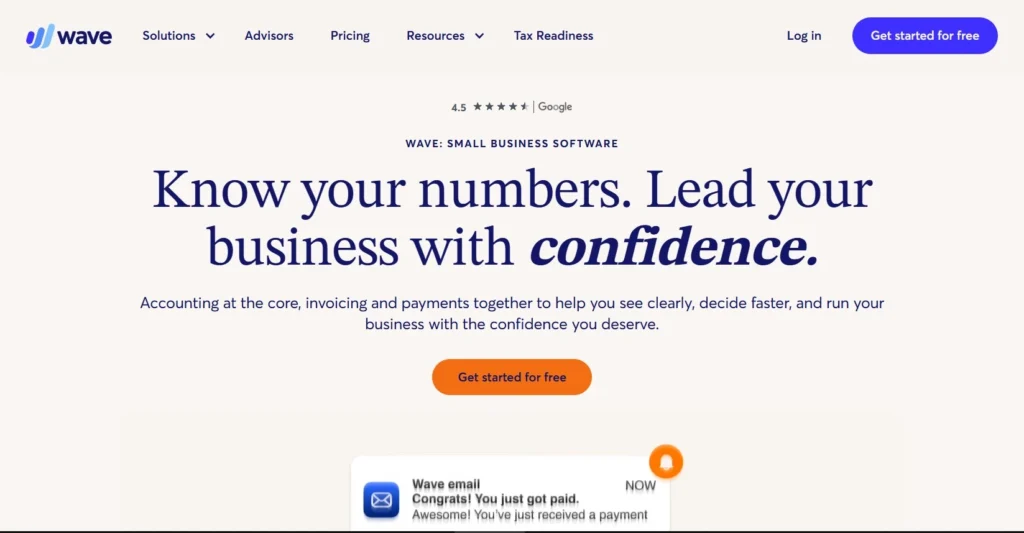
Wave Accounting is a top-tier choice for freelancers and service-based solo entrepreneurs who need simple, reliable bookkeeping without expensive monthly subscriptions. Its intuitive dashboard and professional invoicing tools give micro-businesses a massive edge in financial organization.
Who this is for: Freelancers, independent contractors, and ultra-small service businesses who need free income and expense tracking.
Who it is NOT for: E-commerce stores with heavy inventory, large agencies, or businesses that require advanced financial forecasting and deep third-party integrations.
Rating: 4.6/5 ⭐⭐⭐⭐⭐
Wave Accounting Review: Key Features
Professional Invoicing
Sending a generic, unbranded Word document to a client immediately hurts your professional credibility. Wave Accounting completely modernizes your billing process with its beautiful, built-in invoice generator. You can easily upload your company logo and customize the brand colors in seconds.
The platform allows you to create recurring invoices for clients on monthly retainers. It also features automated email reminders that chase down late payments on your behalf. This hands-off approach ensures you get paid faster without having to send awkward follow-up emails.
Automated Bank Feeds
Manually typing every single business purchase into a spreadsheet is a massive waste of your time. Wave connects securely to thousands of global banks and credit unions to pull your transactions automatically. The software imports your daily income and expenses directly into your dashboard.
Once imported, the platform attempts to automatically categorize these transactions based on your past behavior. You simply review the list, approve the categories, and your books are instantly updated. This automation turns weeks of agonizing tax preparation into a simple afternoon task.
Built-In Payment Processing
Clients hate having to mail physical checks or navigate clunky third-party wire transfers. Wave Payments is seamlessly integrated into your digital invoices, allowing clients to pay instantly. They can click a simple button to submit a credit card payment or an ACH bank transfer.
The funds are then automatically deposited directly into your connected business bank account. The system completely eliminates the need to manually mark invoices as paid, keeping your records perfectly accurate. It reduces payment friction, dramatically improving your overall business cash flow.
Mobile Receipt Scanning
Keeping track of crumpled physical receipts from business lunches or office supply runs is incredibly tedious. Wave offers a dedicated mobile app that turns your smartphone camera into a powerful receipt scanner. You simply snap a photo of your receipt before throwing the paper away.
The software uses advanced optical character recognition to read the total amount and vendor name. It then automatically uploads this digital copy to your accounting dashboard for tax compliance. You will never have to worry about losing a crucial tax deduction again.
Detailed Financial Reporting
You cannot effectively grow a small business if you do not understand your core financial health. Wave Accounting provides a suite of essential reports that are surprisingly robust for a free platform. You can generate accurate Profit and Loss statements with a single click.
It also provides detailed Balance Sheets and Cash Flow statements to track your exact financial trajectory. These simple reports are formatted perfectly for your Certified Public Accountant to review at tax time. You are always equipped with the hard data needed to make smart financial decisions.
Ease of Use
When you first log into Wave Accounting, you are greeted by an incredibly clean and modern interface. The dashboard completely avoids the intimidating, cluttered layouts found in legacy accounting software. It uses simple visual graphs to show your current cash flow and outstanding client invoices.
The initial setup process is highly streamlined and completely intuitive for non-accountants. The onboarding wizard guides you smoothly through connecting your primary bank accounts and setting up your business profile. You can successfully send your very first professional invoice within ten minutes of creating an account.
The learning curve is practically non-existent for basic income and expense tracking tasks. The navigation menu on the left side is clearly labeled, dividing your tasks into sales, purchases, and reporting. You never have to dig through complex sub-menus to find what you actually need.
While basic features are perfectly straightforward, manual journal entries do require some fundamental accounting knowledge. However, most freelancers will never even need to touch these advanced, technical tools. Overall, the platform is intentionally designed to be as frictionless as possible.
Performance & Reliability
Speed is incredibly important when you are trying to quickly reconcile your monthly statements. Wave Accounting operates as a lightweight, cloud-based platform that loads instantly on most desktop browsers. Navigating between complex financial reports and deep invoice histories produces zero noticeable lag.
Stability is generally excellent, but third-party bank connections can occasionally experience minor hiccups. This is an industry-wide issue caused by the banks themselves, not necessarily the accounting software. Fortunately, Wave is quick to notify you if a sync connection needs to be manually refreshed.
The mobile app performance is highly reliable for capturing receipts and sending quick invoices on the go. It rarely crashes and instantly syncs any mobile updates directly to your primary desktop account. However, it does lack the full suite of reporting features found on the web version.
The output quality of the automated categorization engine is surprisingly accurate. It successfully identifies standard expenses like software subscriptions and utility bills with ease. You will only need to manually correct highly obscure or localized vendor names.
Wave Accounting Pricing & Plans
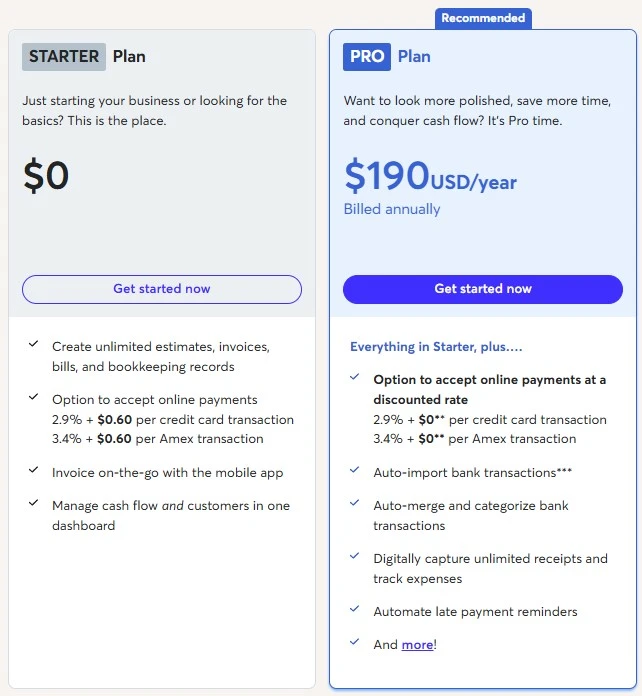
Is Wave Accounting good for businesses on a strict budget? Absolutely. The platform has famously championed a free-forever tier that handles core accounting without monthly subscription fees. Recently, they introduced an optional paid tier to accommodate slightly more complex business needs.
Here is a breakdown of the primary subscription options.
| Plan Name | Monthly Price | Key Features Included | Best For |
| Starter | $0 | Unlimited basic invoicing, bank connections, accounting reports | New freelancers and solo contractors |
| Pro | $16 | Custom invoice layouts, unlimited receipt scanning, automated rules | Growing service-based businesses |
| Payroll | $40 + $6/user | Automated tax filings, direct deposit, employee portals | Businesses hiring their first staff |
The Starter plan remains an incredible bargain for new independent contractors. It provides full access to bank feeds, basic invoicing, and essential reporting at zero cost. The only money you pay is the standard industry transaction fee if you choose to accept credit cards.
The Pro plan is a recent addition designed to streamline administrative work for busier owners. It unlocks unlimited automated receipt scanning and the ability to capture complex user data. It also grants priority customer support, which is highly valuable during tax season.
The Payroll add-on is entirely optional but completely necessary if you hire official employees. It automatically calculates state and federal taxes while offering direct deposit capabilities. Pricing varies slightly depending on which specific tax states you are currently operating in.
Pros and Cons
✅ Pros
- The base accounting and invoicing features are entirely free with no hidden software limits.
- The dashboard is incredibly intuitive and perfectly tailored for users with zero accounting experience.
- Built-in invoice templates are highly professional and deeply customizable to fit your exact brand.
- It securely connects directly to your bank to automate the tedious expense categorization process.
- The digital payment integration drastically reduces the time it takes to get paid by clients.
❌ Cons
- It completely lacks built-in inventory tracking, making it a poor choice for e-commerce stores.
- Customer support on the free tier is strictly limited to an automated chatbot and basic email.
- There is no comprehensive third-party app ecosystem to connect with advanced marketing tools.
- The mobile application lacks the robust reporting features available on the desktop dashboard.
Customer Support
Wave Accounting structures its customer support entirely based on your specific subscription tier. If you are utilizing the free Starter plan, your options for immediate help are severely restricted. You must rely primarily on Mave, their automated chatbot, to troubleshoot basic platform issues.
If the chatbot fails, free users can submit an email ticket, but response times can take days. However, paying subscribers on the Pro or Payroll plans gain access to priority live chat support. These specialized representatives are highly knowledgeable and can quickly resolve complex banking sync errors.
To compensate for the limited free support, Wave maintains an absolutely massive knowledge base. Their help center features hundreds of detailed, step-by-step articles and clearly recorded video tutorials. It is an excellent resource for self-starters who prefer to solve technical problems completely independently.
Top Wave Accounting Alternatives
QuickBooks Online
QuickBooks Online is the undisputed heavyweight champion of the cloud accounting software industry. It features robust inventory management, deep third-party integrations, and advanced financial forecasting tools. However, it carries a heavy monthly subscription fee and a significantly steeper learning curve than Wave.
FreshBooks
FreshBooks is a highly popular alternative built primarily for agencies and creative professionals. It places a massive emphasis on integrated time tracking and managing complex retainer projects. While its invoice design is stunning, it lacks the completely free base tier that makes Wave so appealing.
Xero
Xero is a remarkably powerful accounting platform that caters heavily to scaling, medium-sized businesses. It is widely loved by professional accountants for its clean ledger management and flawless multicurrency support. It is an excellent choice if you plan to aggressively scale, but it is absolute overkill for a solo freelancer.
Conclusion
Wave Accounting is an absolute lifesaver for independent workers trying to escape the nightmare of messy spreadsheets. It perfectly strips away the intimidating complexities of corporate finance, leaving only the tools you actually need. The platform allows you to look incredibly professional to clients without requiring an accounting degree.
While it is definitely not built to handle complex retail inventory, it dominates the service-based sector. The fact that you can manage your entire business ledger for free is an unbelievable value proposition. It drastically lowers the barrier to entry for anyone wanting to start their own company.
If you are ready to completely streamline your tax season and get paid faster, it is time to upgrade.
Frequently Asked Questions
Yes, the core software is completely free forever. You can track your income, connect your bank, and send unlimited basic invoices without paying a monthly fee. You only pay for optional add-ons like credit card processing fees or the premium Pro tier.
No, it is generally not recommended for complex e-commerce. Wave completely lacks dedicated inventory management tools and deep integrations with platforms like Shopify. It is strictly optimized for service-based businesses, freelancers, and independent consultants.
The best alternatives depend entirely on your specific business needs. QuickBooks Online is best for scaling businesses needing inventory, while FreshBooks is ideal for robust time tracking. Xero is highly recommended if you process a massive amount of international, multicurrency transactions.
Yes, Wave offers a dedicated payroll add-on for an additional monthly fee. It can process direct deposits, generate tax forms, and automatically pay your specific state and federal taxes. This feature seamlessly syncs your payroll data directly into your primary bookkeeping ledger.
Yes, Wave offers a free companion app for both iOS and Android devices. You can easily send invoices, check your cash flow, and scan paper receipts directly from your phone. However, you will need to log into the desktop version to access deep financial reports.