Ayoa Review 2026: Mind Mapping Meets Task Management
Imagine you are in the middle of a massive project. Your ideas are scattered across three different notebooks, your tasks are buried in a long email chain, and your team is struggling to see the “big picture.” You need a way to connect your creative brainstorming directly to your daily to-do list without switching between five different apps. This is exactly where Ayoa steps in.
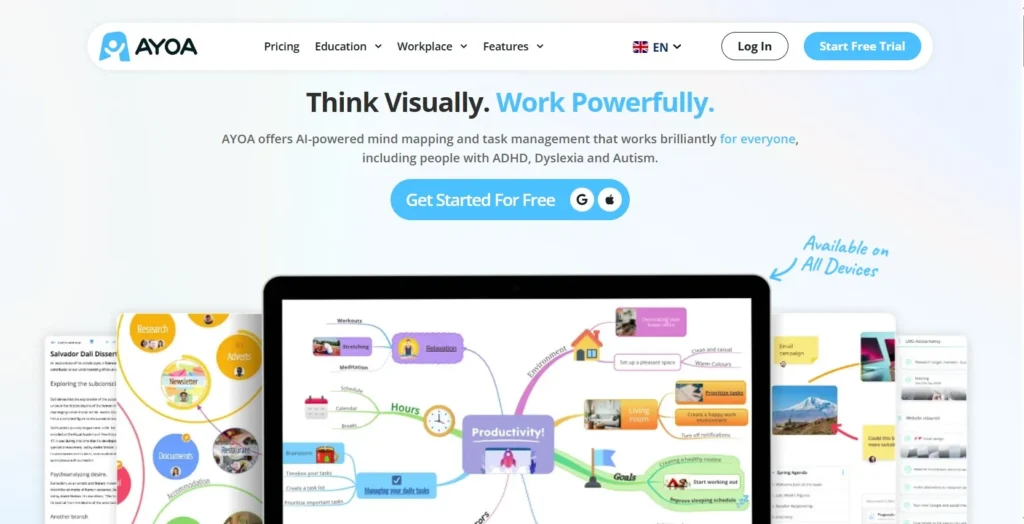
Ayoa is a visual productivity suite that combines mind mapping, whiteboarding, and task management into a single, cohesive environment. It is designed to cater to visual thinkers who find traditional, text-heavy project managers too restrictive. By blending neuro-inclusive design with artificial intelligence, it helps you turn a messy brain dump into a structured plan of action.
In this Ayoa review, we will cover features, pricing, pros, cons, and alternatives.
Quick Verdict — “Tiny Tool Take”
Ayoa is a unique productivity tool that blends mind mapping, visual collaboration, and task management into one platform. It’s designed for teams and individuals who want to brainstorm ideas, organize workflows, and track projects in a more creative, non‑linear way. While it doesn’t have the enterprise depth of tools like Asana or Jira, its visual approach makes it a standout choice for creative professionals, educators, and small teams seeking a more engaging way to plan and execute work.
Who this is for: Creative professionals, educators, and teams who need to bridge the gap between brainstorming and execution. It is particularly helpful for neurodivergent users (ADHD/Dyslexia) due to its highly visual and customizable nature.
Who it is NOT for: Users looking for a simple, text-only checklist or budget-conscious individuals who only need basic mind mapping without task management features.
Rating: 4.4/5 ⭐⭐⭐⭐⭐
Key Features
AI-Powered Mind Mapping
Ayoa leverages artificial intelligence to help you break through writer’s block. You can start with a single keyword, and the AI will suggest branches, questions, and related ideas to expand your map. This makes it an excellent partner for research and deep-dive brainstorming sessions.
Multiple Map Styles
Unlike most tools that lock you into one layout, Ayoa offers various styles including Organic, Speed, Radial, and Capture maps. Organic maps mimic hand-drawn diagrams which are better for memory retention, while Speed maps are built for rapid-fire data entry during live meetings.
Integrated Task Boards
The standout feature of Ayoa is the ability to turn any branch of a mind map into a task. These tasks live on Kanban-style boards or Gantt timelines. This ensures that your “big ideas” actually get assigned to team members and tracked through to completion.
Neuro-Inclusive Design
Ayoa is built with cognitive diversity in mind. It offers specialized fonts (like OpenDyslexic), customizable background colors to reduce visual stress, and an “Auto Focus” mode. This mode hides everything except the branch you are currently working on, which is vital for maintaining focus.
Ease of Use
The onboarding experience in Ayoa is relatively smooth, beginning with a selection of templates that guide you through your first map. The dashboard is vibrant and modern, utilizing a “bubble” or “canvas” approach rather than traditional menus.
However, because Ayoa packs so many tools into one interface—whiteboards, task boards, and multiple map types—there is a slight learning curve. Beginners might feel overwhelmed by the number of icons and customization options available at first. Once you understand the relationship between a “map” and a “task,” the workflow becomes much more natural.
Performance & Reliability
Ayoa is a web-based tool, but it also offers dedicated desktop and mobile apps. On the web version, performance is generally snappy for standard projects. However, users may notice a slight lag when working on massive mind maps with hundreds of branches and high-resolution image attachments.
The real-time collaboration is stable. You can see your teammates making changes to a whiteboard or moving tasks in real-time without significant synchronization issues. The cloud-based nature ensures that your progress is saved automatically, providing peace of mind during long brainstorming sessions.
Pricing & Plans
| Plan | Price (Annual) | Key Features |
| Free | $0 | Basic mind maps, limited tasks, and whiteboards. |
| Mind Map | ~$10/mo | Unlimited maps, AI assistance, and image library. |
| Task | ~$10/mo | Kanban boards, Gantt charts, and team collaboration. |
| Ultimate | ~$13/mo | Everything in Map + Task, plus Zoom integration and more AI. |
The Ultimate Plan offers the best value as it fully connects the brainstorming features with the execution tools, which is the primary reason to use Ayoa over its competitors.
Pros and Cons
✅ Highly visual interface that supports creative thinking styles.
✅ Seamless transition from mind maps to actionable task boards.
✅ Strong AI features for generating ideas and breaking down projects.
✅ Excellent support for neurodivergent users with specialized display settings.
✅ Built-in video chat and collaboration tools for remote teams.
❌ The subscription model can be expensive compared to basic mind-mapping tools.
❌ Can experience performance slowdowns on very large, complex maps.
❌ The interface may feel cluttered to users who prefer minimal designs.
❌ Advanced features like AI and OCR are locked behind the highest tiers.
Customer Support
Ayoa provides a comprehensive Help Centre filled with video tutorials and step-by-step guides. For direct assistance, users can submit support tickets through their website. While they do not offer 24/7 live chat, their email response time is typically within 24 to 72 hours. Users on higher-tier plans generally report more responsive and personalized support.
Top Alternatives
MindMeister
MindMeister is the go-to for pure mind mapping. It is easier to pick up than Ayoa but lacks the robust, integrated task management system. If you only want to make beautiful diagrams, MindMeister is a simpler choice.
Miro
Miro is a giant in the digital whiteboarding space. It offers an infinite canvas and more advanced diagramming tools for technical workflows. However, Ayoa’s specific “Organic Mind Mapping” and neuro-inclusive features make it better for individual creative work.
XMind
XMind is a powerful desktop-first application known for its professional structures and “Pitch Mode.” It is a great budget alternative if you don’t need real-time collaboration or integrated project management.
Conclusion
Ayoa is more than just a mind-mapping tool; it is a complete ecosystem for the creative process. By allowing you to move from a vague idea on a whiteboard to a timed task on a Gantt chart, it removes the friction often found in complex projects. While the pricing is on the premium side and the interface takes a moment to master, the boost in clarity and productivity is worth the investment for visual thinkers and collaborative teams.
Frequently Asked Questions
Ayoa offers a basic free version with limited maps and tasks. To unlock AI features, Gantt charts, and unlimited boards, you will need a paid subscription.
Yes, Ayoa is highly popular in education. Its visual nature helps with essay planning, note-taking, and organizing study schedules, especially for students with dyslexia or ADHD.
Ayoa is primarily a cloud-based tool. While the desktop apps allow you to view some data, a stable internet connection is required for syncing and most collaboration features.
Ayoa is the successor to iMindMap. It takes the organic mapping technology of iMindMap and combines it with modern cloud collaboration and task management features.
Yes, Ayoa integrates with popular tools including Google Calendar, Dropbox, Evernote, Zoom, and Google Drive to help streamline your workflow.