Asana Review 2026: Streamlined Project Management for Teams
It is Monday morning, and your inbox is a disaster. You have three different email threads for one project, a Slack channel buzzing with “quick questions,” and a sticky note on your monitor that you’re positive was important on Friday. Your team is working hard, but nobody is exactly sure who is responsible for the final approval on the latest marketing campaign. You aren’t just managing a project; you are managing chaos.
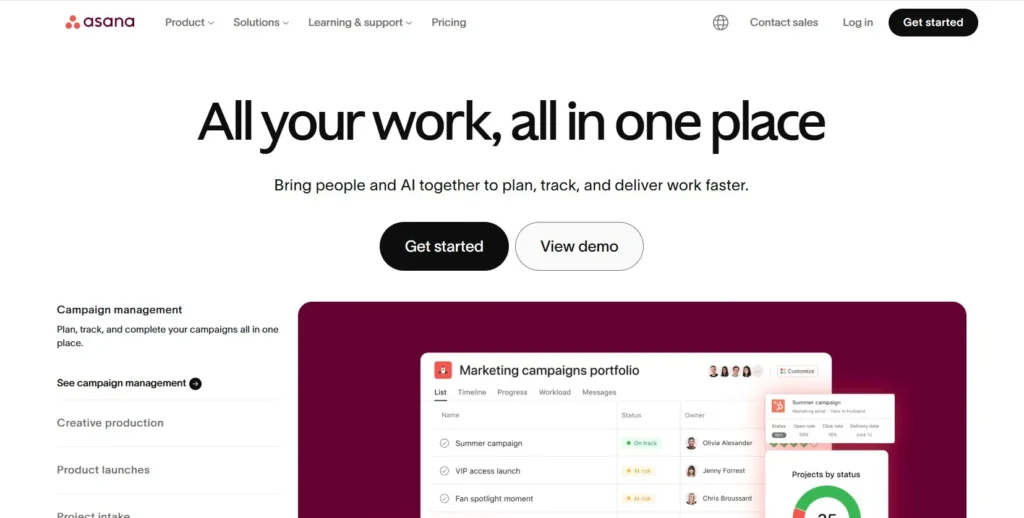
Asana was built to be the “source of truth” for teams that have outgrown spreadsheets and sticky notes. It is a comprehensive work management platform designed to help teams organize everything from daily tasks to strategic company goals. By centralizing communication and task ownership, Asana aims to eliminate the “work about work”—the endless meetings and status check-ins that eat up your productive hours.
In this Asana review, we will cover features, pricing, pros, cons, and alternatives.
Quick Verdict — “Tiny Tool Take”
Asana is a leading project management platform that helps teams organize tasks, track progress, and collaborate seamlessly. With features like timelines, automation, and integrations, it’s built for scaling productivity across small teams and large organizations alike. While it may feel too feature‑rich for solo users or those seeking ultra‑simple tools, its balance of usability and depth makes it a go‑to choice for structured team workflows.
Who this is for: Corporate teams and marketing agencies who need a structured, highly reliable platform to coordinate complex, multi-step projects across different departments.
Who it is NOT for: Solopreneurs who just want a simple to-do list or tiny teams on a zero-dollar budget who need advanced features like Gantt charts for free.
Rating: 4.7/5 ⭐⭐⭐⭐⭐
Key Features
Multi-Dimensional Project Views
Asana allows every team member to visualize work in the way that suits them best. You can toggle between a classic List view for detailed task management, a Kanban Board for workflow stages, a Timeline for Gantt-style dependencies, or a Calendar for deadline tracking. This flexibility ensures that a creative designer and a data analyst can look at the same project through different lenses without losing sync.
Asana AI & Smart Workflows
In 2026, Asana has moved beyond simple automation with its AI-driven “Smart” features. The platform can now summarize long comment threads, draft status updates automatically, and identify potential bottlenecks before they happen. Its AI Studio also allows non-technical users to build “AI Teammates” that can triage incoming requests or organize project data based on simple text prompts.
Goals and Portfolios
For managers, Asana provides a high-level “Portfolios” view to monitor the health of multiple projects at once. These are directly linked to “Goals,” which connect daily tasks to broader company objectives. This feature is vital for corporate teams because it shows exactly how a single subtask contributes to the organization’s quarterly revenue or growth targets.
Workflow Builder & Automation
The Workflow Builder is a visual tool that lets you map out complex processes with triggers and actions. For example, when a designer finishes a task, Asana can automatically reassign it to a manager for approval and move it to a “Legal Review” section. This “Rules” engine ensures that no steps are skipped and saves hours of manual hand-off time every week.
Native Time Tracking
Asana has recently upgraded its native time tracking capabilities. Instead of relying solely on third-party integrations, users can now record time directly on tasks and view “estimated vs. actual” reports. This is a game-changer for agencies that need to bill clients accurately or teams that want to improve their resource planning and capacity management.
Ease of Use
Asana strikes a rare balance between power and simplicity. The interface is clean, colorful, and feels more like a modern app than a dusty corporate tool. The sidebar keeps your projects organized, and the “My Tasks” section acts as a personal command center, gathering every item assigned to you across the entire organization into one prioritized list.
The setup process is guided by templates that cater to specific industries, such as “Creative Requests” or “Product Launches.” These templates come pre-loaded with relevant custom fields and sections, so you don’t have to start from a blank screen. While the advanced features like “Universal Reporting” have a slight learning curve, a basic user can become proficient in the tool within a single afternoon.
Onboarding a large team is simplified by the Admin Console, which gives managers control over permissions and security settings. Asana’s “Home” screen also provides a personalized dashboard showing upcoming deadlines and favorite projects, making it easy for employees to stay focused on their most impactful work without feeling overwhelmed by the platform’s depth.
Performance & Reliability
Asana is known for its “snappy” performance. Despite being a heavy enterprise tool, the transitions between views and the loading of large project boards are nearly instantaneous. This speed is critical for adoption; if a project management tool is slow, team members will revert to using faster, less organized methods like Slack or email.
The platform’s uptime is industry-leading, which is why it is trusted by global brands like Amazon and Google. In 2026, Asana has also improved its offline functionality for mobile apps, allowing you to check tasks or leave comments while traveling, which then sync automatically once you are back online. The stability of its API is another high point, ensuring that integrations with tools like Salesforce and Slack remain reliable.
Pricing & Plans
| Plan | Price (Annual) | Best For | Key Features |
| Personal | $0 | Individuals | Unlimited tasks, 2 users, Basic views |
| Starter | $10.99/user | SMBs | Workflow Builder, Timeline, AI Studio |
| Advanced | $24.99/user | Scaling Teams | Portfolios, Goals, Workload management |
| Enterprise | Custom | Global Orgs | Advanced security, SAML, Data residency |
The Starter plan is the best value for most marketing agencies, as it unlocks the essential automation and timeline features. Large organizations usually opt for Advanced to get the capacity planning and cross-project reporting tools.
Pros and Cons
✅ Highly intuitive interface that encourages team adoption and use.
✅ Powerful AI features that actually save time on status reporting.
✅ One of the best mobile apps in the project management space.
✅ Flexible project views satisfy different work styles (List, Board, Timeline).
✅ Extensive integration library with over 200+ popular business tools.
❌ The free plan is quite limited, now restricted to only 2 users.
❌ Pricing is higher per seat than many of its direct competitors.
❌ You cannot assign a single task to multiple people, which can be frustrating.
Customer Support
Asana provides a robust support ecosystem. For self-service, the Asana Help Center and “Asana Academy” offer hundreds of video tutorials and step-by-step guides. These are particularly useful for teams that want to train their staff without paying for external consultants. Their community forum is also very active, often providing workarounds for niche use cases within minutes.
For direct help, paid users have access to email and chat support. While they do not offer a traditional phone support line for lower-tier plans, their “Asana Support Chatbot” is surprisingly effective at triaging issues and connecting you with a human expert when needed. Enterprise customers receive a dedicated “Customer Success Manager” to help with deployment and long-term strategy.
Top Alternatives
Monday.com
Monday.com is Asana’s closest rival. It is often praised for its “spreadsheet-on-steroids” feel and extreme customizability. While Asana feels more structured and task-oriented, Monday.com is often preferred by teams that need to build complex, custom databases alongside their project management.
ClickUp
ClickUp positions itself as the “one app to replace them all.” It offers significantly more features (like built-in Docs and Whiteboards) at a lower price point than Asana. However, it is also known for being more cluttered and having a steeper learning curve for non-technical users.
Trello
Trello is the go-to alternative for those who find Asana too “heavy.” It focuses almost entirely on Kanban boards. It is perfect for simple workflows and small teams, but it lacks the advanced reporting, goal tracking, and timeline features that make Asana a true enterprise solution.
Conclusion
Asana remains a top-tier choice because it understands the human side of project management. It doesn’t just track data; it creates a workspace where people actually want to spend their time. Its transition into an AI-first platform in 2026 has only solidified its position as a leader for teams that need to scale without losing their minds to administrative overhead.
If you are a growing agency or a corporate department looking for a reliable, professional way to align your team, Asana is worth the premium price. It provides the structure needed to hit big goals while remaining flexible enough to adapt to the way your team actually works. It is less of a “tool” and more of a foundation for your business operations.
Frequently Asked Questions
Asana offers a “Personal” plan that is free forever, but it is now limited to 2 users. If you have a team of 3 or more, you will need to upgrade to a paid plan to collaborate within the same workspace.
Yes, Asana now includes native time tracking on its Starter and Advanced plans. You can also integrate it with popular third-party tools like Harvest, Clockify, or Toggl if you prefer their specific features.
It depends on your style. Asana is generally better for teams that want a clean, task-focused interface with structured workflows. Monday.com is often better for teams that want to build highly customized visual boards for various business processes.
Yes, the Asana mobile app for iOS and Android allows you to create tasks, receive notifications, and leave comments while offline. Your changes will sync as soon as your device reconnects to the internet.
Asana is an enterprise-grade platform with SOC 2 Type II compliance. They offer advanced security features like Two-Factor Authentication (2FA), data encryption at rest and in transit, and regional data residency for Enterprise customers.