

Imagine you are managing a massive product launch. You have a project brief in Google Docs, a budget in Excel, a roadmap in Trello, and a feedback form in Typeform. Every time a date changes, you have to manually update four different places. By noon, you are not managing a project; you are just copy-pasting data.
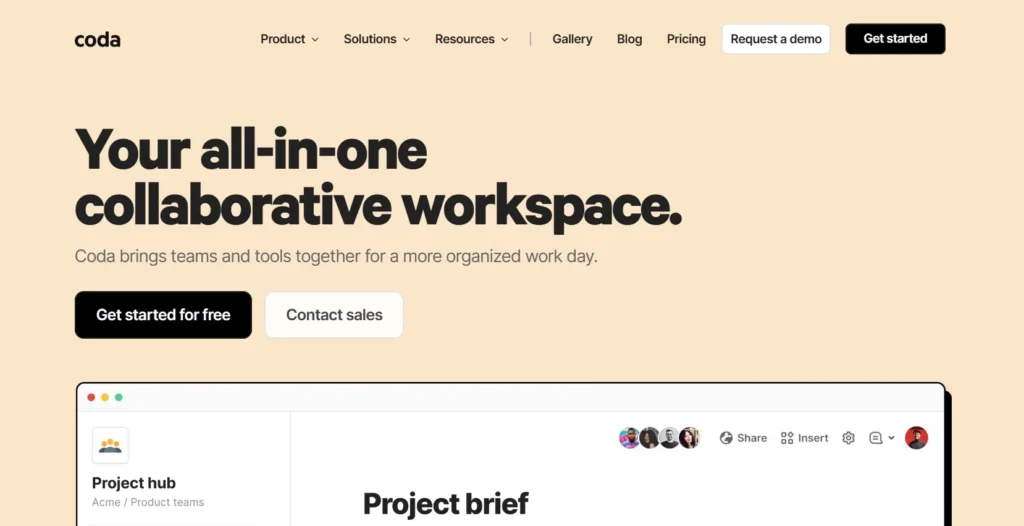
Coda was built to solve this exact “fragmentation” headache. It is a collaborative document that acts like an app builder. It combines the simple writing experience of a doc with the structural power of a database and the logic of an automation tool. Instead of jumping between tabs, you build a single “doc” that handles everything from high-level strategy to daily task execution.
In this Coda review, we will cover features, pricing, pros, cons, and alternatives.
Quick Verdict — “Tiny Tool Take”
Coda is a powerful doc‑app hybrid that helps project managers and operations teams centralize data, automate workflows, and replace scattered spreadsheets with dynamic documents. While it doesn’t have the deep enterprise integrations of tools like Notion or Airtable, its flexibility and automation features make it a compelling choice for teams seeking a single hub for collaboration and execution.
Who this is for: Project managers and operations teams who need a “single source of truth” that includes complex logic, deep integrations, and automated workflows.
Who it is NOT for: Simple note-takers who want a clean, minimalist digital diary or very small teams who find relational databases and advanced formulas overwhelming.
Rating: 4.8/5 ⭐⭐⭐⭐⭐
Key Features
Relational Tables and Views
Coda tables are not just static grids like in a spreadsheet. They act as a relational database. You can create one master “Tasks” table and then create multiple “Views” of that same data across different pages. A developer might see a Kanban board, while a manager sees a high-level Gantt chart, but any change made in one view updates the data everywhere instantly.
Interactive Buttons
One of Coda’s most unique features is the ability to add functional buttons directly into your document. You can create a button that, when clicked, sends a Slack notification, adds a row to another table, or triggers an external API call. This transforms a static document into an interactive internal tool or “mini-app” tailored to your team’s specific process.
Coda Packs (Integrations)
While many tools have basic integrations, Coda uses “Packs” to bring live data from other apps directly into your doc. You can pull Jira tickets into a table, sync Google Calendar events, or even push updates to GitHub. These aren’t just links; the data lives inside Coda, allowing you to run formulas and automations on information from external sources.
Coda AI
In 2026, Coda has fully integrated its AI assistant into the core experience. Coda AI can summarize long meeting notes, draft content based on table data, and even help you write complex formulas. Because the AI has context of your entire document, it can perform highly specific tasks, like “summarize all overdue tasks into a bulleted list for our Slack channel.”
Advanced Formula Language
Coda features a powerful formula language that can be used anywhere in the doc—not just inside tables. You can use formulas to create dynamic text that changes based on your data. For example, a header can automatically display the number of days remaining until a launch date, making your documents feel “alive” and always up to date.
Ease of Use
Coda has a clean, modern interface, but it comes with a significant learning curve. If you have ever used a spreadsheet, you will feel comfortable with the basics. However, unlocking Coda’s true power requires learning its formula syntax and understanding how relational data works. It is a “builder’s tool” that rewards those who like to tinker.
The setup process is significantly faster thanks to the Coda Gallery. This is a massive library of pre-built templates for everything from OKR tracking to inventory management. Instead of starting with a blank page, you can install a template and then customize the logic and layout to fit your team’s specific needs.
For everyday users—the people who just need to enter data or check tasks—the experience is very smooth. You can hide the complex “under-the-hood” logic so that your team only sees the buttons and tables they need to interact with. This makes it a great choice for Ops teams who want to build custom tools for their less-technical colleagues.
Performance & Reliability
Coda is a browser-based tool that performs exceptionally well for medium-sized projects. The responsiveness of the interface is high, and real-time collaboration is seamless. You can see your teammates typing and making changes in real-time without any lag or version conflicts.
However, Coda can struggle with performance when a document becomes extremely large. If you have a doc with tens of thousands of rows and hundreds of complex automations, you may notice a decrease in load speeds. In 2026, Coda has introduced better “Cross-doc” syncing, allowing you to split massive systems into smaller, connected documents to maintain high performance.
Pricing & Plans
| Plan | Price (Annual) | Best For | Key Features |
| Free | $0 | Individuals | Unlimited users, connected tables, basic packs |
| Pro | $10/maker | Personal Projects | Unlimited doc size, 30-day history, Pro packs |
| Team | $30/maker | Collaborative Teams | Unlimited automations, doc locking, Team packs |
| Enterprise | Custom | Large Organizations | SSO, Advanced security, Dedicated support |
Note: Coda uses a unique “Doc Maker” pricing model. You only pay for the people who create and edit the structure of docs. Everyone else (viewers and editors) is usually free, making it very cost-effective for large teams with only a few admins.
Pros and Cons (H2)
✅ Unmatched flexibility to build custom workflows and internal apps.
✅ Pricing model only charges for “Doc Makers,” allowing unlimited free collaborators.
✅ Powerful “Packs” that sync live data from external tools.
✅ Advanced formulas and buttons that automate repetitive manual work.
✅ Excellent template library to help you get started quickly.
❌ Steeper learning curve compared to simpler tools like Notion.
❌ Performance can lag in documents with extremely large datasets.
❌ Mobile app is less powerful than the desktop version for building.
Customer Support
Coda offers excellent support through a variety of channels. Their Help Center is filled with detailed articles and video tutorials that cover everything from basic setup to advanced formula logic. They also maintain an active community forum where users share tips, templates, and troubleshooting advice.
For direct assistance, Coda provides email and chat support. Response times are generally quick, and the support staff is highly technical, which is necessary given the complex nature of the tool. Users on higher-tier plans receive priority support and access to “Customer Success” managers to help with large-scale deployments.
Top Alternatives
Notion
Notion is the most direct competitor to Coda. It is widely praised for its beautiful, minimalist design and ease of use. While Notion is better for building beautiful wikis and simple project trackers, it lacks Coda’s deep logic, advanced formulas, and interactive buttons.
Airtable
Airtable is a “database-first” tool. It is much more powerful than Coda when it comes to managing massive amounts of structured data and building complex relational backends. However, Airtable lacks Coda’s document-style flexibility, making it less ideal for projects that require a mix of long-form writing and data.
Google Sheets
For teams that just need to crunch numbers, Google Sheets is still a viable alternative. It is free and universally understood. However, it lacks the collaboration features, task management views, and automation capabilities that make Coda a comprehensive project management solution.
Conclusion
Coda is not just a document editor; it is a platform for building the exact tool your team needs. It bridges the gap between a simple text doc and a complex custom software application. While the learning curve is real, the ability to centralize your entire operational workflow into a single, automated source of truth is a massive competitive advantage.
In 2026, Coda remains the best choice for project managers and operations teams who are tired of “app hopping.” If you are willing to invest a little time into learning how it works, Coda will reward you by becoming the most powerful tool in your tech stack. It is the ultimate “lego set” for business productivity.
Frequently Asked Questions
Is Coda free?
Yes, Coda has a very generous free plan that includes unlimited collaborators. You only need to pay when you want to create larger documents, use advanced automations, or access “Team” level integrations.
How is Coda different from Notion?
Coda is more focused on “building apps” and deep data logic, while Notion is more focused on “building wikis” and knowledge management. If you need complex formulas and buttons, go with Coda. If you want a sleek, easy-to-use digital notebook, go with Notion.
Can Coda replace my CRM?
Yes, many small and medium-sized businesses use Coda as a lightweight CRM. With its relational tables and “Packs” for email and Slack, you can track leads, manage pipelines, and automate follow-ups without paying for a dedicated CRM like Salesforce.
Does Coda work offline?
Coda has limited offline support. You can view docs you have recently opened and make some basic edits, but you will need an internet connection for real-time syncing, automations, and using “Packs.”
Can I import my data from other tools?
Absolutely. Coda has built-in importers for Notion, Airtable, Trello, and Google Sheets. You can also use “Packs” to keep your data synced with external tools in real-time rather than doing a one-time import.