

Managing a small team often feels like herding cats. You start with a simple to-do list, but soon you are buried under endless email threads, scattered files, and missed deadlines. Most project management tools promise to help, yet they often come with so many complex features that you need a week of training just to move a task from “To Do” to “Done.”
Breeze is a project management tool designed specifically to solve this problem by focusing on simplicity. It provides a clean, visual workspace that allows teams to track progress without the “tool fatigue” caused by more bloated platforms.
In this Breeze review, we will cover features, pricing, pros, cons, and alternatives.
Quick Verdict — “Tiny Tool Take”
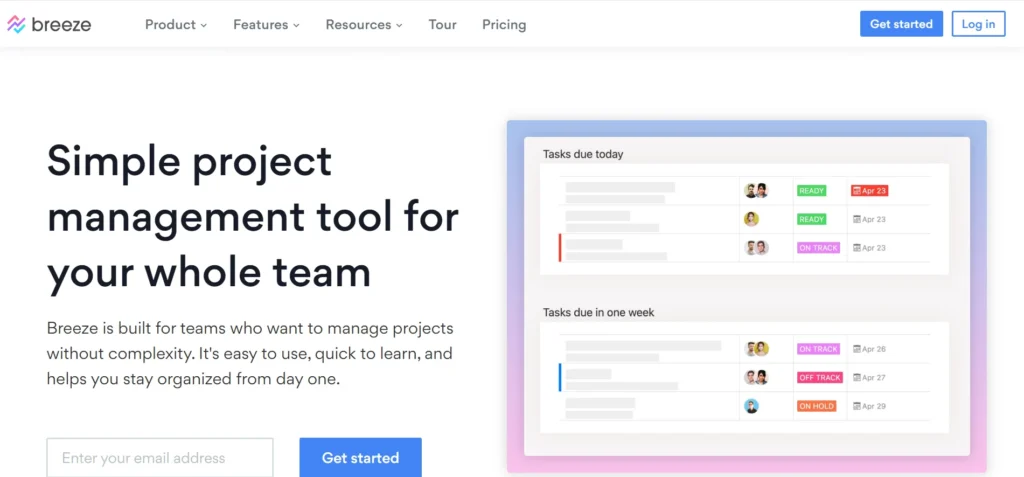
Breeze is a lightweight project management tool designed for small teams and freelancers who value simplicity over complex feature sets. While it lacks the enterprise‑level depth of platforms like Asana or ClickUp, its clean interface and straightforward task tracking make it an excellent choice for those who want productivity without the clutter.
Who this is for: Small teams, startups, and creative agencies who need a visual way to track work without a steep learning curve.
Who it is NOT for: Large enterprises requiring deep resource management, complex Gantt dependencies, or highly advanced automation logic.
Rating: 4.6/5 ⭐⭐⭐⭐⭐
Key Features
Visual Project Boards
Breeze uses a Kanban-style interface that makes it easy to see the status of every task at a glance. You can drag and drop cards across columns to reflect your workflow. This high-level visibility ensures that no task falls through the cracks and everyone knows their current priorities.
Built-in Time Tracking
Unlike many competitors that require third-party integrations, Breeze includes native time tracking. Team members can start a timer directly on a task or log hours manually. This is invaluable for agencies that need to track billable hours or teams wanting to improve their internal efficiency.
Unified Team Communication
Communication happens directly on the task cards. You can tag team members, leave comments, and attach files from Google Drive or Dropbox. By keeping the conversation tied to the work, you eliminate the need to dig through Slack or email to find context for a specific assignment.
Project Reporting & Analytics
Breeze offers straightforward reports that show you team activity, task completion rates, and time spent on projects. These aren’t overly complex charts; they are practical insights designed to help you identify bottlenecks and see which projects are eating up the most resources.
Client Collaboration
One of the standout features is the ability to invite clients into your projects for free. You can control exactly what they see, allowing them to track progress and provide feedback without giving them access to internal-only discussions or sensitive data.
Ease of Use
The dashboard clarity is the strongest selling point of Breeze. When you log in, you aren’t met with a maze of menus. Instead, you see a clean list of your projects and a simplified navigation bar.
The setup process takes minutes rather than hours. You can create a project, define your workflow columns, and invite your team via email almost instantly. There is virtually no learning curve; if you have ever used a sticky note, you can use Breeze.
For teams moving away from spreadsheets or basic to-do lists, the transition is seamless. The interface feels snappy and responsive, which encourages team members to actually update their tasks in real-time.
Performance & Reliability
Breeze is a web-based platform that prioritizes speed. Task updates and card movements happen instantly without refreshing the page. During our testing, the stability remained consistent even when handling multiple large projects simultaneously.
The platform also offers dedicated mobile apps for iOS and Android. While they are slightly more limited than the desktop version, they provide a reliable way to check notifications, leave comments, and track time while on the go.
Pricing & Plans
Breeze keeps its pricing as simple as its interface. Unlike competitors with complex tiers and gated features, Breeze offers a straightforward model.
| Plan | Price (Monthly) | Key Features |
| Solo | $14 /month | 1 User, all features, unlimited projects |
| Team | $9 /user/month | Unlimited projects, unlimited clients, all features |
| Annual | $8.10 /user/month | 10% discount, paid yearly, all features |
Breeze offers a 14-day free trial with no credit card required, allowing you to test the full feature set before committing.
Pros and Cons
✅ Pros
- Extremely intuitive interface that requires zero training.
- Unlimited free client users save significant money for agencies.
- Native time tracking is included in the base price.
- Clean, distraction-free environment helps teams focus.
- Simple, transparent pricing with no hidden tiers.
❌ Cons
- Lacks advanced automation features found in tools like Asana.
- Mobile app experience is basic compared to the web version.
- No free-forever plan for very small teams.
Customer Support
Breeze provides support primarily through email and social media channels like Twitter. While they don’t offer 24/7 phone support, their response times are generally quick, often within a few hours during business days.
They also maintain an extensive knowledge base. It includes clear guides and video tutorials that cover everything from basic setup to advanced project reporting, making it easy to find answers on your own.
Top Alternatives
Trello
Trello is the most famous Kanban-style tool. It offers a generous free tier and a massive library of “Power-Ups” for integrations. It is a great choice if you want a tool that can grow into a more complex system via third-party add-ons.
Basecamp
Basecamp focuses on “all-in-one” communication. It is less focused on visual boards and more on message boards, schedules, and docs. It is ideal for teams that want to replace their internal email and chat entirely.
Asana
Asana is better suited for teams that need complex project views like Timelines and Gantt charts. It offers more powerful automation and reporting features, though it comes with a much steeper learning curve than Breeze.
Conclusion
Breeze lives up to its name by making project management feel effortless. It avoids the feature bloat that plagues modern SaaS tools, focusing instead on what small teams actually need: tasks, communication, and time tracking.
If you are a startup or a small agency tired of over-complicated software, this tool is a perfect fit. It provides enough structure to keep you organized without getting in the way of your actual work. We highly recommend it for teams that value speed and simplicity over complex enterprise features.
Frequently Asked Questions
Breeze is more feature-complete out of the box for teams, as it includes time tracking and reporting natively. Trello is more flexible but often requires paid “Power-Ups” to match Breeze’s built-in functionality.
Yes, Breeze has apps for both iOS and Android. They allow you to manage tasks, track time, and communicate with your team from anywhere.
Yes. Breeze allows you to invite unlimited client users for free. You can also use privacy settings to hide specific tasks or comments from them.
Breeze does not have a “free-forever” plan, but they offer a 14-day free trial that gives you access to every feature without needing a credit card.
Breeze uses SSL encryption for all data transfers and hosts its data in secure, ISO-certified data centers. They also allow you to export your data in HTML or JSON format at any time.