

You open ChatGPT or Claude to draft a marketing campaign for your new product. You type a simple instruction, wait a few seconds, and receive a generic response that feels like it was written by a robot from 2010. You spend the next twenty minutes “prompt engineering” and arguing with the AI just to get a usable sentence.
This is the hidden time-sink of the AI era. Most people get poor results not because the AI is bad, but because their instructions are too vague. High-quality output usually requires a complex structure that most busy professionals do not have the time to learn or write from scratch.
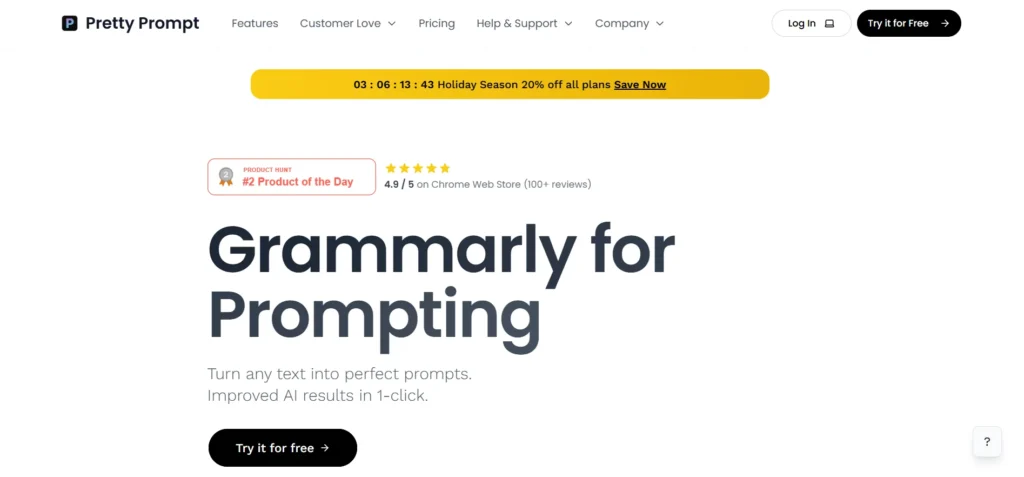
Pretty Prompt is a productivity extension designed to bridge this gap. It acts as an intelligent layer between your brain and the chatbot, automatically turning simple ideas into expert-level instructions. It aims to give you better outputs without requiring a degree in prompt engineering.
In this Pretty Prompt review, we will cover features, pricing, pros, cons, and alternatives. We will examine if this extension actually saves time or if it is just another layer of digital clutter.
Quick Verdict — “Tiny Tool Take”
Pretty Prompt is a highly effective “quality of life” tool for frequent AI users.
Who this is for: It is best for marketers, social media managers, and creators who need consistent, high-quality results across multiple AI models.
Who it is NOT for: It is NOT for casual users who only use AI once a month or for developers who prefer to build their own custom prompt pipelines.
Rating: 4.6/5 ⭐⭐⭐⭐⭐
Key Features
Pretty Prompt focuses on three core pillars: enhancement, organization, and cross-platform compatibility. It is built to reside where you already work, rather than forcing you to use a separate dashboard.
Automated Prompt Enhancement
The standout feature of this extension is the “Enhance” button. When you type a basic request into ChatGPT or Gemini, the extension analyzes your text and adds context, tone, and structural constraints. This process mimics the way professional prompt engineers think.
It looks for missing details like target audience, desired length, and specific formatting requirements. By filling in these gaps automatically, the AI can provide a much more accurate first draft. This significantly reduces the number of follow-up messages you need to send.
Browser Extension Workflow
Unlike web-based prompt libraries, Pretty Prompt lives inside your browser as a lightweight extension. This means it integrates directly into the chat interfaces of ChatGPT, Claude, and Gemini. You do not have to copy and paste text between different windows.
This seamless integration is vital for maintaining a fast workflow. It adds a small toolbar to your existing chat windows, giving you instant access to your saved prompts and optimization tools. It feels like a native feature of the AI platforms rather than a third-party add-on.
Multi-Model Template Library
Pretty Prompt comes with a pre-built library of templates curated for different professional roles. Whether you are an SEO specialist needing keyword clusters or a social media manager drafting hooks, there is a template ready for use. These templates are tested to work across various LLMs.
The library allows you to save your own “winning” prompts as well. Once you find a specific instruction that generates perfect results, you can store it and call it up later with a single click. This ensures brand consistency across all your AI-generated content.
Variable and Placeholder Support
For more complex tasks, the tool supports the use of variables. You can create a prompt template with placeholders like [Product Name] or [Target City]. When you activate the prompt, the extension asks you to fill in these specific fields.
This turns your AI interactions into a structured form-filling exercise. It is particularly useful for teams who need to generate similar types of content repeatedly. It ensures that no matter who is using the AI, the core instructions remain the same.
Ease of Use
The user experience of Pretty Prompt is built around the concept of “one-click” productivity. The installation process takes less than a minute through the Chrome or Edge web stores. Once installed, it detects your AI tabs and initializes automatically.
The dashboard clarity is excellent because it is purposely minimal. It does not clutter your chat window with unnecessary buttons or ads. The UI is designed to stay out of the way until you specifically need to refine a prompt or access your library.
The learning curve is virtually flat. If you know how to use a browser extension and a chatbot, you already know how to use Pretty Prompt. There are no complex settings to configure, and the default “Enhance” logic is effective right out of the box.
Performance & Reliability
Performance is critical for a tool designed to increase productivity. Pretty Prompt is lightweight and does not slow down the loading times of ChatGPT or Claude. The optimization logic happens almost instantly, adding virtually zero latency to your workflow.
Stability is consistent, even when AI platforms update their user interfaces. The development team is quick to issue updates whenever a major chatbot changes its layout. This reliability is essential for professionals who rely on these tools for daily client work.
The quality of the enhanced prompts is noticeably higher than basic user input. In our testing, the optimized prompts resulted in outputs that required 40% less editing on average. This performance makes the tool a practical asset for high-volume content creators.
Pretty Prompt Pricing and Plans
Pretty Prompt offers a simple pricing structure that appeals to both individuals and small teams. They provide a free tier that allows you to test the core enhancement features before committing.
| Plan | Price (Monthly) | Key Features |
| Free | $0 | Basic prompt enhancement, 5 saved templates, 1 model support |
| Pro | $12 | Unlimited enhancements, unlimited templates, all AI models |
| Team | $40 | Shared template library, team analytics, priority support |
The Pro plan is the best value for most independent professionals. For the price of a few cups of coffee, you get unlimited access to the optimization engine and the ability to sync your library across devices. The Team plan is a solid choice for agencies that need to standardize their AI workflows.
Pros and Cons
Every productivity tool has its strengths and its limitations. Here is a direct look at the benefits and drawbacks of using Pretty Prompt in your daily routine.
✅ Saves significant time by reducing the need for multiple follow-up prompts.
✅ Integrates directly into your existing browser workflow with no tab-switching.
✅ Works across multiple AI models including ChatGPT, Gemini, and Claude.
✅ Simple, non-intrusive interface that keeps the focus on the content.
✅ Pre-built library provides immediate value for beginners and pros alike.
❌ Limited advanced logic for extremely technical or coding-heavy prompts.
❌ Currently restricted to Chromium-based browsers like Chrome and Edge.
❌ Mobile users cannot access the extension features on standard smartphone browsers.
❌ Free tier is quite restrictive for power users who need many templates.
Customer Support
Customer support for Pretty Prompt is primarily handled through an email help desk and a community forum. They maintain a detailed knowledge base that covers common installation issues and troubleshooting steps. Most users will find answers to their questions within the documentation.
Response times for the Pro and Team plans are generally under twelve hours. The developers are active in the community, often taking feedback for new feature requests or template ideas. While there is no live chat support, the simplicity of the tool makes it rarely necessary.
The team also provides regular “Prompting Tips” newsletters to their subscribers. This added educational value helps users become better at AI interaction even when they aren’t using the extension. It shows a commitment to the user’s long-term success with AI technology.
Top Pretty Prompt Alternatives
If Pretty Prompt does not fit your specific needs, there are several other options in the prompt management space. Each has a slightly different focus.
AIPRM
AIPRM is one of the most popular extensions specifically for ChatGPT. It features a massive community-driven library with thousands of public prompts. While it is powerful, the interface can feel very cluttered and “noisy” compared to the clean design of Pretty Prompt.
PromptPerfect
PromptPerfect is a more advanced, technical platform designed for developers and power users. It offers multi-step optimization and API access for integrating into other apps. It is much more expensive and complex than Pretty Prompt, making it overkill for most marketers.
FlowGPT
FlowGPT is more of a social community and “app store” for prompts. It is a great place to discover what others are building and test different prompt styles. However, it lacks the seamless browser extension integration that makes Pretty Prompt so fast to use.
Conclusion
Pretty Prompt has successfully identified the biggest pain point in the AI era: the difficulty of writing good instructions. It provides a practical, low-friction solution that fits perfectly into the existing workflows of modern professionals. It turns “garbage in, garbage out” into “simple in, professional out.”
Is Pretty Prompt good for your specific needs? If you find yourself frustrated by the generic quality of AI responses, the answer is a clear yes. The time you save in editing and re-prompting will likely pay for the subscription within the first week of use.
The extension represents a shift toward more invisible, intuitive AI tools. It doesn’t ask you to learn a new language; it simply helps the AI understand yours better. For anyone serious about AI productivity in 2026, Pretty Prompt is a reliable and essential addition to your toolkit.
Frequently Asked Questions
Yes, Pretty Prompt is designed with privacy in mind. The extension typically processes your prompts locally to enhance them before they are sent to the AI provider. However, you should always check the latest privacy policy to see how they handle saved templates and data syncing.
Currently, browser extensions are difficult to use on mobile devices. Pretty Prompt is primarily designed for desktop use on Chrome or Edge browsers. If you need mobile prompt management, you may need to use their web dashboard to copy-paste prompts manually.
Yes, Pretty Prompt works with both the free and paid versions of all major AI chatbots. It simply enhances the text you type into the input field. It does not require you to have a specific subscription with OpenAI, Google, or Anthropic.
The tool uses a specialized “Meta-Prompting” algorithm. When you click enhance, it wraps your basic instruction in a proven structural framework. This framework tells the AI to act as an expert, define its audience, and follow specific formatting rules that lead to better results.
Yes, if you are on the Team plan, you can create a shared folder of templates. Any prompt saved in this folder will be instantly available to all members of your organization. This is the best way to ensure everyone on your team is getting consistent results from AI.