

You are twenty minutes away from a major social media product launch. You have the captions ready and the schedule set, but you realize your main promotional graphic looks dated and cluttered. Opening professional software like Photoshop feels like a death sentence for your deadline because you simply do not have the time to deal with layers and complex masking.
This is the exact moment where most marketers and creators feel the pressure of the “design gap.” You need the high-end polish associated with the Adobe brand, but you need the speed of a mobile app. In the past, you had to choose between difficult professional tools or overly simplistic templates that made your brand look generic.
Adobe Express was built to bridge this gap by offering a cloud-based, AI-driven design environment. It aims to provide a streamlined experience that allows anyone to create professional-grade content in seconds. It targets those who value aesthetic quality but cannot afford to spend hours on a single post.
The platform has evolved significantly, integrating powerful generative AI to handle the heavy lifting of content creation. Whether you are building an Instagram Reel, a business flyer, or a professional logo, the tool provides a path of least resistance. It represents Adobe’s move to make its legendary creative power accessible to everyone.
In this Adobe Express review, we will cover features, pricing, pros, cons, and alternatives.
Quick Verdict — “Tiny Tool Take”
Adobe Express is a top-tier design partner for anyone who needs “Adobe-level” results without the steep learning curve. Its integration of Firefly AI makes it a formidable competitor to Canva, offering superior typography and asset quality.
Who this is for: Social media managers, small business owners, and marketing teams who need high-quality assets fast.
Who it is NOT for: Professional illustrators or photographers who require the deep technical control of Photoshop or Illustrator.
Rating: 4.8/5 ⭐⭐⭐⭐⭐
Key Features
Adobe Firefly Generative AI
The standout feature of the current Adobe Express experience is the integration of Adobe Firefly. This generative AI allows you to create high-quality images and unique text effects simply by typing a description. You can generate a “retro neon sign” effect or a “futuristic forest background” in seconds.
This matters because it eliminates the need for expensive stock photography or custom font design. You can describe exactly what you need, and the AI produces multiple variations for you to choose from. It is a massive productivity boost for creators who want to stand out with original visuals.
One-Click Quick Actions
Adobe Express includes a dedicated library of “Quick Actions” that perform complex technical tasks instantly. These tools allow you to remove backgrounds, resize images for different platforms, and convert videos to GIFs with a single click. You can even generate QR codes or convert documents to and from PDF format.
This feature is a lifesaver for busy marketers who manage multiple social media channels. You no longer have to look up the specific dimensions for a LinkedIn banner versus a TikTok cover. The tool handles the technical formatting so you can focus on the creative message.
Professional Video and Animation Tools
Unlike many simple design tools, Adobe Express offers a robust video editing suite. You can combine clips, add audio tracks, and apply professional animations to your text and images. It features a drag-and-drop timeline that makes video production accessible to non-editors.
Video is currently the most engaging format on the web, and this tool makes it easy to produce. You can take a static flyer and animate the elements to create a high-energy social media ad. It bridges the gap between static design and full-scale video production perfectly.
Adobe Stock and Fonts Integration
When you use Adobe Express, you gain access to a massive library of high-quality assets. This includes millions of professional Adobe Stock photos, videos, and music tracks. You also get access to the legendary Adobe Fonts library, which features thousands of premium typefaces.
This matters because font choice and image quality are the two biggest factors in “professional” design. Many free tools offer limited or generic fonts that make your brand look amateur. Having the world’s best creative library at your fingertips ensures your work looks expensive and curated.
Brand Kits and Creative Cloud Libraries
Maintaining brand consistency is a major challenge for growing businesses. Adobe Express allows you to create Brand Kits that store your logos, colors, and fonts in one central location. Every time you start a new design, your brand assets are ready to be applied with one click.
For those already using the Adobe ecosystem, the Creative Cloud Libraries integration is essential. You can pull assets created by a professional designer in Photoshop or Illustrator directly into your Express project. It creates a seamless workflow between the “pro” tools and the “quick” tools for your entire team.
Ease of Use
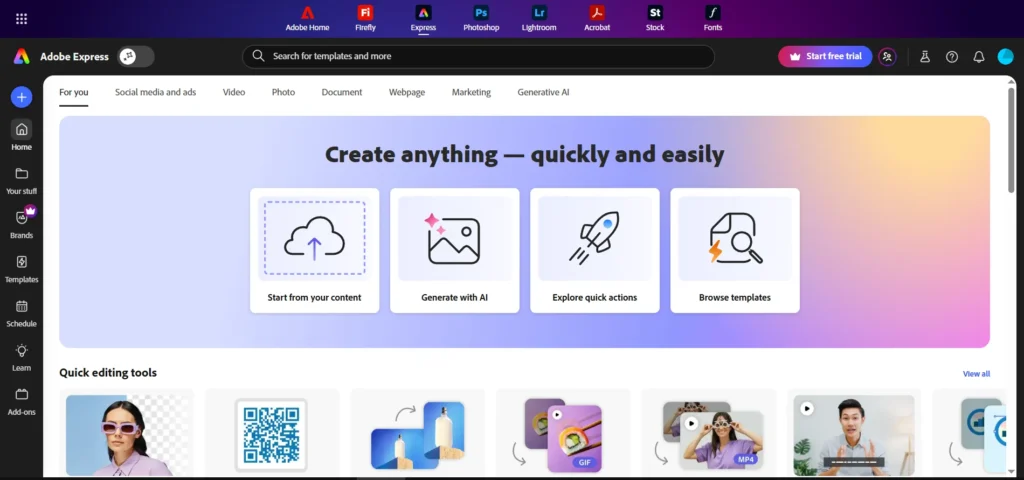
The dashboard of Adobe Express is remarkably clean and follows a logical flow. When you log in, you are greeted with a search bar and categorized templates based on your goals. There is no confusing technical jargon, making it approachable for absolute beginners.
The setup process is fast because the tool is entirely browser-based. You do not need to download heavy software that consumes your computer’s RAM. You can sign up with an email address and start your first project in less than two minutes on any computer with an internet connection.
The learning curve is very flat. If you have ever used a smartphone app or a drag-and-drop website builder, you will feel at home immediately. Most tools are “one-click” operations that provide a preview of the change before you commit. It is designed to be a “get in, get out” tool for people with busy schedules.
Performance & Reliability
Speed is a major performance indicator for Adobe Express. The editor remains snappy even when working with complex video files or high-resolution images. Rendering and exporting designs usually take a few seconds, which is impressive for a web-based application.
The stability of the platform is a significant advantage. Because it is backed by Adobe’s robust cloud infrastructure, you rarely experience crashes or lost work. The auto-save feature is highly reliable, ensuring that every small change you make is protected in real-time.
Output quality is professional across the board. You can export designs in high-resolution PNG, JPG, PDF, or MP4 formats depending on your needs. The AI-driven tools, like the background remover, produce clean edges that rival the results of manual masking in professional software.
Pricing & Plans
Adobe Express uses a “freemium” model that is very accessible for startups and casual users. While the Free plan is generous, the Premium plan unlocks the true power of the Adobe asset libraries and AI features.
| Plan | Best For | Key Features |
| Free | Casual hobbyists | Core features, basic fonts, 25 AI credits |
| Premium | Small businesses | Adobe Stock, full Font library, Brand Kits |
| Teams | Agencies / Brands | Collaborative tools, 1TB storage, Admin console |
The best value plan for most people is the Premium subscription. It provides unlimited access to the entire stock library and more monthly AI credits for Firefly tasks. If you already have an Adobe Creative Cloud “All Apps” subscription, Adobe Express Premium is usually included at no extra cost.
Pros and Cons
✅ Best-in-class typography thanks to the Adobe Fonts integration.
✅ Powerful generative AI that creates original images and text effects.
✅ Seamless workflow with other Adobe apps like Photoshop and Illustrator.
✅ Incredibly fast background removal and resizing tools.
✅ Professional video editing features that are easy to master.
❌ The high-resolution stock library is restricted to paid plans.
❌ Requires a stable internet connection as it is a cloud-based tool.
❌ Occasional “lag” when processing very large generative AI requests.
❌ Mobile app and desktop browser versions have slightly different layouts.
Customer Support
Adobe provides support through a massive help center, community forums, and a direct ticketing system. Their knowledge base is one of the best in the industry, featuring thousands of video tutorials and step-by-step guides. This makes it very easy to troubleshoot issues or learn new design techniques.
Response times for support inquiries are generally good, especially for Premium and Team users. While they do not offer a “dedicated” live chat for every single user, the community forums are very active. You can often find an answer from an Adobe Expert within a couple of hours for almost any technical problem.
Top Alternatives
Canva
Canva is the most direct competitor and offers a slightly larger ecosystem of third-party apps. It is a great choice if you want the widest variety of pre-made templates. However, Adobe Express often provides higher-quality fonts and more professional-looking stock photography for the same price.
VistaCreate
VistaCreate is another strong alternative that focuses on ease of use and high-quality design elements. It offers excellent background removal and a wide range of animated formats. Choose VistaCreate if you want a tool that feels very modern and social-media-first without the Adobe branding.
Creatopy
Creatopy is a specialized tool that focuses heavily on ad automation and high-volume banner creation. It is the best choice for large-scale marketing agencies that need to produce hundreds of ad variations at once. It is more expensive than Adobe Express and is built for a more narrow, professional ad-focused audience.
Conclusion
Is Adobe Express good for your marketing needs in 2026? After a thorough Adobe Express review, the answer is a clear yes for anyone who wants to stop fighting with their design tools. It is a platform that respects your time and your brand’s visual integrity.
The real power of Adobe Express lies in its heritage. You are not just getting a simple template tool; you are getting the distilled power of thirty years of professional design technology. It allows a solo entrepreneur to compete with a full design agency by providing the highest quality assets in an easy-to-use format.
While it may not replace the deep functionality of Photoshop for high-end retouchers, it is the perfect “daily driver” for everyone else. It provides the polish and professionalism required to stand out in a crowded digital landscape. If you want to elevate your visual brand with minimal effort, Adobe Express is a solid investment.
Frequently Asked Questions
Yes, there is a generous free plan that includes all core features and basic design assets. You can create and export designs without ever entering your credit card details.
Absolutely. All designs created in Adobe Express using the provided templates and assets are licensed for commercial use. You can safely use them for your business ads, social media, and websites.
Yes, Adobe Express has a highly-rated app for both iOS and Android. It syncs perfectly with your desktop account, allowing you to start a design on your computer and finish it on your phone.
Free users receive a set number of AI credits each month for tasks like text-to-image. Premium users get a significantly higher allowance, which resets at the beginning of every billing cycle.
Yes, users on the Premium and Team plans can upload their own custom brand fonts. This ensures that every piece of content you create matches your existing brand identity perfectly.